
You can now build a little AI helper that answers questions about your own company documents. They’re genuinely handy. But pick the wrong setting and they get expensive fast. Here’s what to watch.
If you use Microsoft 365, you’ve probably noticed Copilot turning up everywhere: in Word, in Teams, in your inbox. The part fewer people have met yet is that you can now build your own little assistant on top of it. You point it at a folder of your company’s documents, and your team can ask it questions in plain English, right inside Teams, as if they were messaging a very well-read colleague.
Microsoft calls the workshop where you build these things Copilot Studio, and each assistant you build is an agent. Don’t worry too much about the names. The thing to picture is simple: a chat helper that has read all your files so your people don’t have to.
The sort of thing people ask it:
- Explain our branding guidelines to me
- What do these three supplier contracts say about termination?
- Summarise the safety requirements across these site documents
- Which policy covers working from home, and what does it say?
This is the good stuff. It’s why people build these helpers, and it’s why staff keep coming back to them. The assistant reads the library so nobody has to, and answers in plain English. Then the monthly bill arrives, and a handful of questions has quietly eaten a worrying slice of it.
Nothing is broken. It’s billing exactly the way Microsoft says it will. But the way that billing works surprises almost everyone the first time, and the everyday questions above (reading lots of documents and making sense of them) are exactly the kind that cost the most. Before we get to why, a quick minute on how you pay for one of these assistants at all, because the surprise only makes sense once you’ve seen the ordinary case.
How You Pay for One of These Assistants
You don’t pay per person, or per question exactly. Microsoft uses a kind of in-app currency called Copilot Credits, and everything the assistant does spends some. You buy credits in a shared pot for the whole organisation. A standard pack is 25,000 credits, which lands somewhere around $300 to $400 a month depending on how you’re licensed, or you can pay as you go at roughly a cent and a half per credit. So as a rough feel: a credit is worth a touch over a cent, and a pack is your monthly tank.
The good news is that most of what an assistant does costs a small, fixed number of credits. It doesn’t matter whether the question was easy or hard. The price per action is set.
| What the assistant does | Cost |
|---|---|
| Gives a pre-written answer you set up in advance | 1 credit |
| Writes an answer itself | 2 credits |
| Takes an action for you (looks something up, runs a step) | 5 credits |
| Reads your Microsoft 365 documents to answer | 10 credits per answer |
One question usually does a couple of these at once. Microsoft’s own example matches the document assistant we’ve been describing: it reads your files (10 credits) and writes an answer (2 credits), so 12 credits a question. That reading charge is flat. It’s 10 credits whether the assistant glanced at one document or skimmed forty to find the answer.
So on the ordinary setting, that’s the whole bill. Twelve credits, call it fifteen cents, for an answer, easy question or hard, every single time. Predictable enough to plan a year around.
That’s the picture most people have in their heads. And it’s right, until one setting gets changed.
The One Setting That Changes Everything
When you build one of these assistants, you choose which AI “brain” powers it, from a menu Microsoft gives you. Some are everyday brains. Some are the heavyweight, deep-thinking ones. They all answer questions perfectly well, so it’s tempting to just pick the cleverest-sounding one and move on. That choice is the whole ballgame for your bill.
Here’s why. The flat prices in that table are only half the story. The everyday brains charge you those flat prices and nothing more, the tidy, predictable picture from a moment ago. But the heavyweight brains add a second charge on top, and this one works completely differently.
The second charge isn’t a flat price per question. It’s billed by the sheer amount of text involved, counted in what the industry calls tokens (think of a token as roughly a word). Every word of every document the assistant reads to answer you, plus every word it writes back, gets tallied up and charged. And crucially, this second charge only switches on for the heavyweight brains. Pick an everyday one and it never runs at all.
The thing worth pinning above your desk: it’s the type of brain that flips the switch, not the company that made it. Microsoft sorts every option into “everyday” or “deep reasoning.” The label, not the brand name, decides whether that second charge kicks in.
This catches people out because they reach for the impressive-sounding option assuming smarter is simply better. Take Anthropic’s Claude as an example: its “Opus” model sits in the deep-reasoning group, while its “Sonnet” model sits in the everyday group. Same maker, two very different bills. The lesson isn’t “avoid this brand or that one.” It’s “check which group your chosen brain is in,” because an everyday brain, whoever made it, never starts that second meter.
And that second charge counts more than you’d guess. It tallies everything going in, the question plus all the document text the assistant pulled up to answer it, and everything coming out, including the deep-thinking brain’s own private “working out” as it reasons toward the answer. All of it is text, and all of it is charged.
Why “Read These Documents for Me” Is the Pricey Bit
Now put those two things together, and the friendly everyday questions from the top of this article turn out to be the worst possible case for a heavyweight brain.
Ask it to explain your branding guidelines, and it has to pull the whole guideline document in to read it. Ask about three contracts, and in go all three. The entire point of the task is to feed lots of document text through the assistant, and on a deep-reasoning brain, every word of that text is on the meter. “Tell me about these contracts” really means, in billing terms, “push a great deal of text through the expensive charge.”
It’s also exactly the work that makes a deep-thinking brain think longest. Summarising, comparing, reconciling what different documents say: that’s where it does the most private “working out,” and all that working out is charged too.
There’s a third multiplier, and it’s usually the biggest. A single question often isn’t one trip to the brain, it’s several, as the assistant reads a bit, thinks, goes back for more, and refines. Each trip re-sends everything gathered so far as fresh text to be charged again. The same paragraphs get billed over and over within a single answer. That re-reading is what turns a question costing a few cents on an everyday brain into one costing dollars on a heavyweight one.
| One document question | Everyday brain | Heavyweight brain |
|---|---|---|
| Writes an answer (flat) | charged | charged |
| Reads your documents (flat) | charged once | charged once |
| The text-by-the-word charge | switched off | every word, every trip |
| What it costs you | small, predictable | many times higher |
When you look at where the credits went, these charges get lumped under a heading like “knowledge,” which is why the report reads as though answering questions about your documents is what’s draining the budget. In a sense it is, but not because there’s a special “reading” charge. It’s that text-by-the-word charge, run up by a heavyweight brain doing exactly what you asked.
One more fact, because it points straight at the cheapest fix. If the person using the assistant has their own paid Microsoft 365 Copilot licence, and they’re using it inside Teams as an employee, all of this is free for them. Every charge above, including the expensive one, is waived. The bills almost always come from people without that licence, members of the public using a customer-facing assistant, or staff who aren’t licensed. That one fact reframes the whole problem.
What to Actually Do About It
There’s a sensible order to work through, cheapest and least disruptive first.
Pick an everyday brain unless you really need the heavyweight
This is the big one, and the easiest. For the everyday questions, the guidelines, the contracts, the policies, an everyday brain answers just as well as the heavyweight, at a sliver of the cost, with that second charge switched off entirely. Save the deep-thinking option for the genuinely hard jobs, like untangling contradictory clauses across a dozen contracts. Most assistants get pointed at the most powerful brain out of a hunch that cleverer must be better, when the everyday one would have answered the same and cost a fraction.
If you want specifics: Microsoft’s standard options (the GPT models most people land on by default) sit in the everyday group and are genuinely good at reading and summarising documents. They’re not a compromise here. They’re the right tool. Start there, try it for a fortnight on your real questions, and only reach for a heavyweight brain if something actually falls short.
Put a ceiling on it
You can set a monthly credit limit on each assistant, so one change of setting or one keen user can’t quietly drain the whole organisation’s pot before anyone notices. We can set this up for you in about ten minutes. Think of it as a circuit breaker.
Give the heavyweight brain only to the people it’s free for
Remember that staff with their own Microsoft 365 Copilot licence don’t run up these charges at all inside Teams. So if one team genuinely needs the deep-thinking option, the neat trick is to limit that particular assistant to those licensed people. The cost problem simply vanishes, within Microsoft’s fair-use rules.
For heavier use, do the expensive bit outside Microsoft, without changing the experience
This is the option most people don’t know exists, and it’s the one worth a conversation with us. If answering questions about your documents at real volume is just how your team likes to work (and lots of use is a good sign it’s earning its keep) it can work out far cheaper to do the heavy reading and thinking on a purpose-built setup, rather than on Microsoft’s meter.
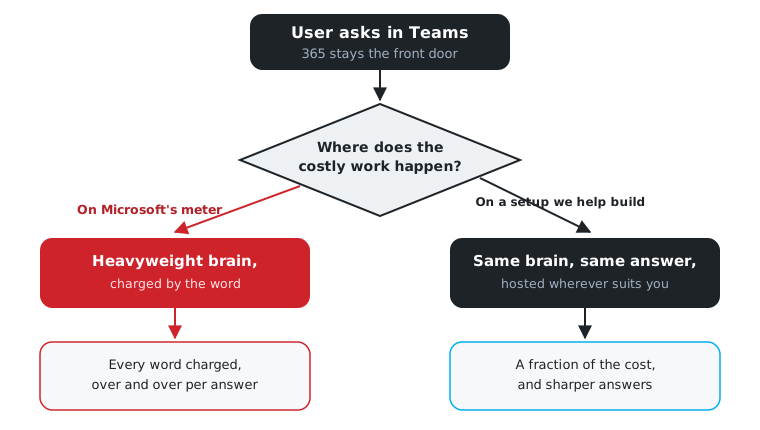
The clever part is that your people wouldn’t notice any difference. They still ask the assistant in Teams, in plain English, exactly as now. Microsoft 365 stays the friendly front door. Behind it, the costly text-crunching happens on a setup built for the job, at a small fraction of the per-word price, because it’s billed at the raw going rate instead of Microsoft’s marked-up one.
This is where we come in: we help you build that engine and connect it back into Teams. It can live wherever makes sense for you, on your own servers, in your own Azure, or hosted by us, whatever fits your size, your budget, and your rules about where data lives. You’re not locked into anyone’s cloud, including ours.
You get a second benefit, too: better answers. When that engine is built around your documents, we control how they’re organised and searched, which is what really decides whether “tell me about these contracts” comes back sharp or vague. That’s a lever the off-the-shelf version keeps hidden.
Here’s the whole idea in one picture.
The Short Version
These assistants aren’t billing you unfairly. They charge by the word whenever you put a heavyweight brain to work, and reading your own documents is the wordiest job you can give one. Most of the time the fix is simply choosing the everyday brain, which answers just as well for a sliver of the cost. If your team leans on this heavily, there’s a smarter setup we can build that keeps the friendly Teams experience but moves the expensive part off Microsoft’s meter. Which one suits you comes down to how much you use it, and that’s worth sorting out before you buy a bigger pack of credits.
Copilot bill behaving strangely?
We’ll work out where the money’s going and what’s worth doing about it. In plain English, with the numbers shown, no jargon required. Talk to us on 1300 798 718 or visit rwts.com.au.
How we can help
More from the blog
Securing your business in the AI Era
06 May 2026
Join Andrew Yager and Phil Meyer from Catalyst 345 as they talk about how to use the Microsoft Ecosystem to deliver Secure AI in your …
Read more
Microsoft 365 phishing is spreading through church organisations. Here’s how to spot it.
14 May 2026
Over the past week we’ve watched a phishing campaign tear through Sydney’s Christian church networks. It’s clever, it’s working, and your email filter won’t stop …
Read more
Stage Desk: the app I built last weekend using AI to run an AI workshop for people who don't know anything about AI
21 Sep 2026
Built in a weekend using AI, Stage Desk is a custom workshop app that combines slides, live image and video generation, and multi-screen control — …
Read more