
Most cybersecurity advice is written for companies with an IT department. It assumes someone manages the laptops, someone writes the policies, and someone gets paged when something breaks. A school P&C run by three parents on their own phones has none of that. Neither does the local soccer club, the musical society, or the charity working out of someone's spare room.
That gap has bothered us for a while. So we built something to close it.
The Cyber Health Check is a short, free survey that gives small organisations an honest picture of where their cyber risk actually sits — without the jargon, without an audit, and without needing anyone technical to answer it. It's live now at cybersurvey.rwts.com.au.
This isn't our first go
We ran an earlier version of this back in 2022. Plenty of organisations took part, and we sent every one of them a picture of where they stood. The exercise was genuinely useful — but the feedback from the smaller groups taught us more than the results did.
The gist of it: the survey was too structured. It worked reasonably well for organisations that looked a bit like a small business — defined roles, a few shared systems, someone who could answer for the whole group. For the really small, really informal end of the spectrum, the neat questions just didn't fit. People told us the feedback they got back didn't reflect their reality, because the questions had never quite captured it in the first place.
We sat with that for a while, and three things became clear.
First, we needed far more scenario-based questions — asking what people actually do in a given situation, not whether they "have" some control with a name they'd never use. Second, one person's answers were never going to be enough; we needed to bring several people's responses together and read the whole organisation, not a single viewpoint. And third, the same structure that fits a volunteer committee fits a small business just as well. A two-person trades business and a suburban netball club have more in common, security-wise, than either has with a company that employs an IT manager. So this version serves both.
Why we made it
Ask a volunteer treasurer whether their organisation has "application whitelisting" and you'll get a blank look. Fair enough. The question doesn't mean anything to someone running a club off a personal mobile and a shared Gmail account. And when people are forced to answer questions like that, they tend to guess — usually optimistically. The answers end up describing the organisation they wish they had, not the one they've got.
There's a second problem, and it's the interesting one. In a small organisation, no single person knows everything. The treasurer holds the bank logins. The secretary runs the mailing list. The president signs off on payments but couldn't tell you the password to anything. Ask any one of them "is the organisation secure?" and you only ever get one slice of the truth.
So we stopped asking one person. We ask a few — and we pay close attention to where they disagree.
What it actually feels like to do it
We built this to live on a phone, because that's where committee members actually are. Here's the whole journey.
Someone from your organisation registers it — the name, what kind of group it is, and your ABN if you have one. We check the ABN live against the Australian Business Register so we know you're a real organisation and not someone fishing for data.
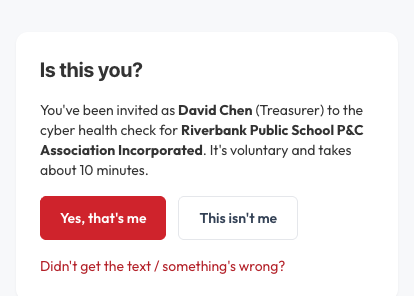
From there, the organiser invites the rest of the committee or team by mobile and email. Each person gets a text and an email with a secure link. Tap it, and the first thing you see is a simple "Is this you?" screen — we don't send a login code until you confirm the invitation was actually meant for you. A wrong number should never strand a real person or leak a code to a stranger.
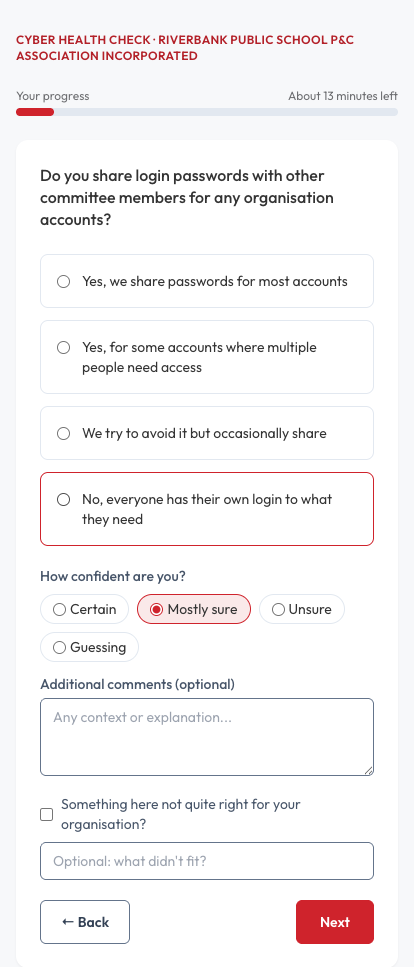
Then you answer. One question per screen. No walls of text, no checklist of acronyms. The questions are framed around what you actually do — little scenarios and everyday situations — rather than whether you "have" some control you've never heard of. For each one you give it a quick rating, tell us how sure you are of your answer, and add a note if you want to. Ten minutes, give or take.
At the end there's an optional reflection: what you learned, what you'd change, what worries you. You can skip it. Most people don't — and that part has already taught us something we didn't expect.
flowchart TD
    A[Organisation registers<br/>name, type, ABN]:::primary --> B[We verify the ABN<br/>against the business register]
    B --> C[Organiser invites the team<br/>by text and email]
    C --> D["Is this you?" check<br/>before any code is sent]:::tertiary
    D --> E[Secure sign-in<br/>text code + email link]
    E --> F[Short survey<br/>one question per screen]
    F --> G[Done — plus an optional<br/>reflection at the end]:::accent
What makes it different from a checklist
A normal security questionnaire is flat: tick this, tick that. Ours adapts. It starts broad and only digs deeper where it's relevant to you — so a Facebook-only club never gets asked about its "custom domain settings," because why would it have any?
We also ask about the same thing from a few different angles on purpose. If three people on the same committee give three different answers about who can approve a payment, that's not a glitch in the survey. That's a finding. A treasurer and a president disagreeing about the money tells us something real about how the organisation works — and it's exactly the kind of thing a single-person assessment would miss entirely.
One more thing: we don't average disagreement away. Where people see things differently, we record that as the result, because the gap itself is what's worth knowing.
What you get, and what we do with your answers
You get a clear, plain-English picture of where your organisation is exposed and where to focus first. Not a forty-page report nobody reads. A short, useful read that tells you the handful of things that actually matter for a group your size.
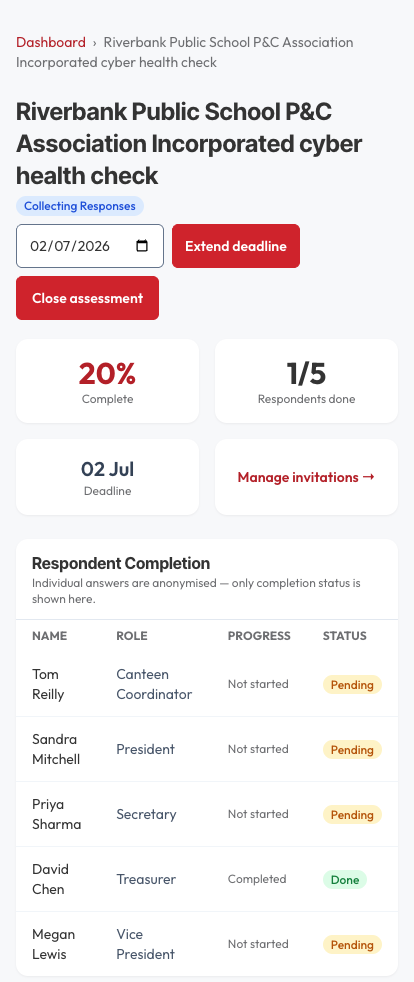
Your individual answers stay private to you. The organiser sees who has finished — a simple completion tracker — but never sees anyone's actual responses. What gets pulled together is the organisation-level picture, not a record of who said what.
We're upfront about where the product is today. The survey itself is fully live and collecting real responses right now. The scoring engine that turns those answers into a polished report is still being refined — we've built sensible starting points, and we're tuning them against real-world results and independent expert review rather than pretending we've got it all figured out from day one. That's the honest state of play, and we'd rather tell you than oversell it.
Who it's for
Right now there are two versions: one shaped for not-for-profit committees — P&Cs, sporting clubs, musical societies, small charities — and one for small businesses. The platform picks the right one for you automatically based on how you register. Adding the small-business version was a direct result of what we learned in 2022: a small business without dedicated IT faces the same questions a volunteer committee does, just with invoices instead of membership fees.
If you run a small organisation and you've ever had that low-level worry about whether your members' data, your bank access, or your members' kids' details are properly looked after, this is for you. It costs nothing, it takes about ten minutes per person, and at the end you'll know more than you did this morning.
New to it and want to walk your committee through? Our step-by-step User Guide shows every screen, for both organisers and committee members.
Curious how your organisation stacks up? Start the Cyber Health Check at cybersurvey.rwts.com.au, or call us on 1300 798 718 if you'd like a hand getting your committee set up.
How we can help
More from the blog

Why We're Treating Every International Sign-In as a Risk
26 Jun 2026
Account takeover attempts are rising, and we're responding by treating international, VPN-masked, and unusual sign-ins as risks to verify rather than logins to trust.
Read more
"FortiBleed" and Your Fortinet Firewall: Where Real World Customers Stand
18 Jun 2026
If RWTS manages your Fortinet devices, you're not affected by FortiBleed. We've checked every device we manage against the breach data and confirmed none of …
Read more
CloudPBX not affected by 3CX Breach
31 Mar 2023
Yesterday (30th March 2023) it became public that 3CX’s Desktop Client had been compromised by a malicious piece of malware, resulting in ransomware being installed …
Read more