
Did you get an alert from the Australian Signals Directorate about your Fortinet firewall? Here's our answer, up front: if Real World manages your Fortinet devices, you're not affected by this. We've already checked. You don't need to do anything.
This week a large pile of working logins for Fortinet firewalls and VPN gateways turned up in the wild — tens of thousands of devices across nearly 200 countries. The security world is calling it "FortiBleed," and the Signals Directorate has sent alerts to a lot of Australian organisations. If one landed in your inbox and gave you a fright, that's understandable. This post is the thing to read.
Below: what actually happened, why the devices we manage for you aren't exposed and how we confirmed it, and — if you've got a Fortinet device somewhere we don't manage — exactly what to do about it.
What actually happened
First, a correction to the scary name. FortiBleed isn't a single flaw in Fortinet's software, and it isn't a new bug we all need to patch by Friday. Fortinet's own assessment is that it's a re-sharing of credentials from earlier breaches, combined with attackers brute-forcing and cracking passwords. The Signals Directorate describes it the same way: a campaign built on exposed credentials, not a freshly discovered hole.
So how do attackers get those credentials? A few ways. They scrape passwords from old leaks. They harvest them with information-stealing malware on people's laptops. And — this is the important part — where a firewall's management screen is reachable from the public internet, they pull the device's configuration file and crack the password hashes inside it offline, on banks of graphics cards that can test billions of guesses a second.
Then they log in. Either to the firewall's admin interface or to the VPN. From there they can change settings, weaken your security controls, and move into the network behind it.
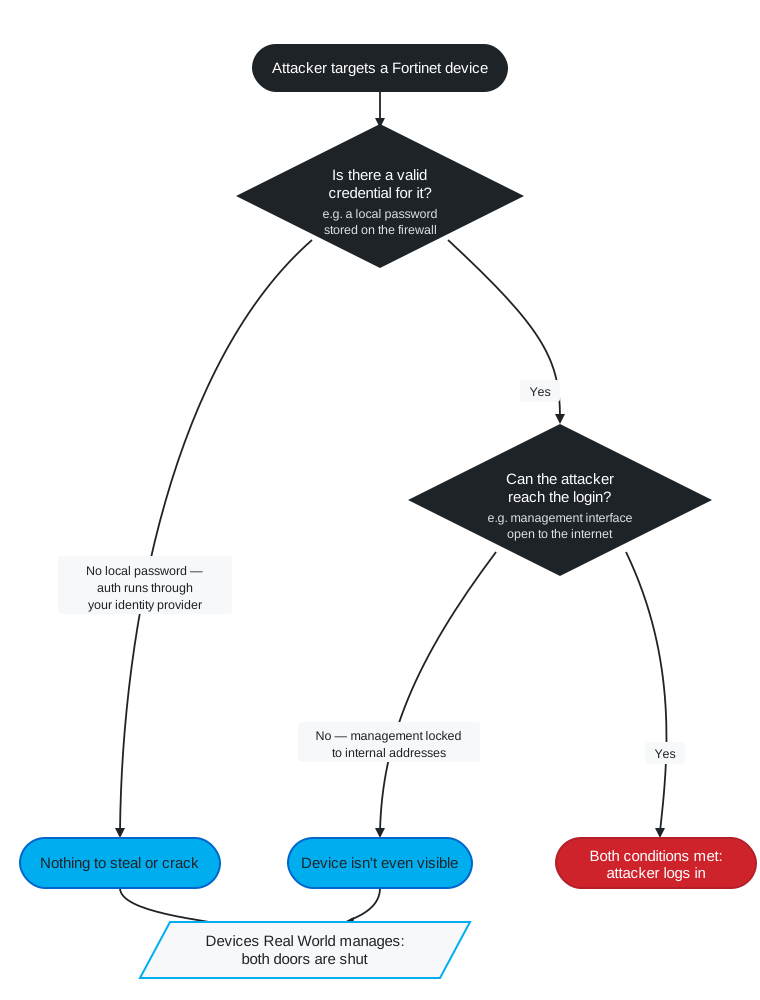
Two conditions have to be true for that to work against a given device:
- The attacker needs a valid credential for that device — usually a local password stored on the firewall itself.
- The attacker needs a way to reach the login — most commonly, a management interface left open to the internet.
Take either one away and the attack falls over. Take both away and there's nothing to attack.
Why your Fortinet devices aren't exposed
Here's how we run the Fortinet firewalls we manage, and why each choice matters for this specific campaign.
Authentication runs through your identity provider, not the firewall. Your VPN logins are handled by your identity platform — Microsoft Entra ID or similar — with multi-factor authentication in front. There's no local VPN password sitting on the firewall to be stolen from a config file or cracked offline. And even if an attacker somehow had a password, it's useless without the second factor. The single biggest pool of credentials in the FortiBleed dump is local device passwords. Your devices don't have those to lose.
The management interface isn't on the internet. The admin screens on your firewalls are locked to internal addresses and access lists. We test that they are. An attacker sweeping the internet looking for exposed Fortinet management pages — which is exactly how this campaign found most of its victims — simply doesn't see your device. It isn't on the list.
Firmware has been current since the relevant bugs were disclosed. The older Fortinet vulnerabilities that fed earlier leaks were patched on your devices when they were announced, not months later. Current firmware also changed how Fortinet stores passwords, from a fast hash that cracks easily to a deliberately slow one that doesn't. On the devices we manage, there's no soft credential left to crack even in a worst-case "what if they got the config" scenario.
So when you read that the SSL VPN portal has to face the internet — true, it does, every VPN does — that's an authentication surface, not a FortiBleed weakness. The thing this campaign preys on is a local password behind that portal. Yours sits with your identity provider, behind MFA.
We didn't just assume — we checked
This is the part we want to be honest about, because it's the difference between a real answer and a comforting one.
We could have written this post on the strength of "we always set things up properly." And we do. But "should be fine" isn't good enough when there's a live breach database sitting on the internet that anyone can search. So we did two things.
We reviewed the configuration of every Fortinet device we manage against exactly the conditions this campaign needs — local accounts, internet-facing management, firmware level. And we compared our managed estate against the publicly circulating breach data. In every case, the conditions FortiBleed depends on weren't present, and none of the devices we look after showed up.
That's not luck. We lock management interfaces down, push authentication to an identity provider, and keep firmware current because of attacks like this one — long before this one had a name. The processes exist so that the bad day doesn't.
Can we promise nothing will ever go wrong, on any device, forever? No. Anyone who tells you that is selling something. Security is about removing the conditions an attack needs and then checking your work, not about guarantees. What we can tell you, plainly, is this: for the Fortinet devices Real World manages, we've looked, and FortiBleed has nothing to grab onto.
If you've got a Fortinet device we don't manage
Here's the honest boundary. Everything above is true for the devices we manage, set up the way we set them up. It isn't a blanket statement about Fortinet gear in general — and we'd be doing you a disservice if we let you read it that way.
If you've got a Fortinet firewall somewhere we don't look after — a branch office, a site that came with an acquisition, a downstream customer of yours, a bit of kit a previous provider left behind — it needs a look. We know this matters because we've already seen a device in exactly that bucket, outside what we manage, show up in the compromised data. It happens, and it's fixable.
The good news is the fix isn't complicated, and it's the same advice the Signals Directorate is giving. If a device might be exposed, here's what to do:
- Rotate the credentials. Every admin password and every VPN login on that device. Password strength doesn't matter here — if a password has already leaked, the only thing that helps is changing it. This is the one step that actually invalidates what an attacker may already be holding.
- Get the management interface off the internet. If you can reach the firewall's admin login from the public internet, so can everyone else. Lock it to internal addresses, or to a known set of trusted ones. This single change removes most devices from the attackers' line of sight.
- Turn on multi-factor authentication for the VPN and anything else facing outward. A stolen password is worthless if the attacker can't get past the second factor.
- Update the firmware, then have an admin log in once afterward. That last step matters more than it sounds — on Fortinet devices it's what forces old, crackable stored passwords to be re-secured with the stronger method.
- Check the logs. Look for logins from odd places or at odd hours, and for admin accounts you don't recognise. Rotating passwords won't help if someone's already inside and has set up their own way back in.
If you're not sure what you've got, or you'd like us to check a device that isn't currently on our books, that's exactly the kind of thing we're here for.
Talk to us — 1300 798 718. We'll tell you where you actually stand.
How we can help
More from the blog

Why We're Treating Every International Sign-In as a Risk
26 Jun 2026
Account takeover attempts are rising, and we're responding by treating international, VPN-masked, and unusual sign-ins as risks to verify rather than logins to trust.
Read more
How Safe Is Your Club, Really? A Ten-Minute Cyber Health Check
19 Jun 2026
Free cyber health check built for small clubs, committees, and community organisations — not IT departments. Ten minutes, plain English, and an honest picture of …
Read more
CloudPBX not affected by 3CX Breach
31 Mar 2023
Yesterday (30th March 2023) it became public that 3CX’s Desktop Client had been compromised by a malicious piece of malware, resulting in ransomware being installed …
Read more